There are so many books on HTML, it's hard to decide what is the
best. These books are good for beginners because they are very visual,
use lots of examples and descriptions, and aren't afraid to explain even
the simplest of tasks. If you're a beginner who wants to learn HTML,
you won't go wrong picking up one of these books. (Note: most HTML books
assume some understanding of how computers work.)
This
great book will take you through HTML and all the elements of Web
design. It's a beginners guide, but it's great for non-beginners as
well. It covers many elements of Web design, from HTML, to graphics, to
layout.
The
Visual QuickStart series of books make it easy to learn how to do
almost anything, and the HTML book by Elizabeth Castro is no different.
It includes color images to explain how to do almost any task you might
do on a Web page. It's very easy to read and understand, and it offers
many tutorials and explanations to help a beginner through any tough
HTML situation.
Joe
Burns has been teaching HTML on the Web for many years. He has a
lighthearted style and tone that carries through from his Web page
across to his book. This book is heaped with tutorials to take you
step-by-step through some of the basics of Web page development. It is
not as visual as some of the books higher on this list, but it is still a
great book for beginners.
This
book is easy to understand and a quick read. It has lots of information
about HTML 4 and you'll be pleased with how well your pages look when
you've finished the book.
This
is a wonderful book for a beginning Web page builder. It includes
graphics that you can use on your site, ideas for Web site projects, and
help in creating your first Web page. It has a very whimsical and
informal style that might put off more serious developers, but it still
offers a lot of information in an easy to read package.
While
not exactly a beginner's book, this book is one of the best all-around
HTML books available. It is a must-have for any Web developer's
reference library. It covers all the HTML tags and their uses, as well
as advanced techniques. Once you've learned a little HTML, you won't go
wrong in buying this book.
This
is not really a beginner's book, as it covers much more than just HTML.
But it is good for someone looking for a more comprehensive book that
covers things like HTML, Java, PHP, ASP, and more.
How
can you resist that title? While it certainly is a more
all-encompassing title than the book really is, you won't go too far
wrong with this book. You'll learn a lot about HTML.
It
used to be that I didn't like the "For Dummies" books, but they are
growing on me. Like most of them, this one makes it easy and fun to
learn about Web design.
140 color names are defined in the HTML and CSS color specification (17
standard colors plus 123 more). The table below lists them all, along with their
hexadecimal values.
Tip: The 17
standard colors are: aqua, black, blue, fuchsia, gray, green, lime,
maroon, navy, olive, orange, purple, red, silver, teal, white, and yellow.
Click on a color name (or a hex value) to view the color as the
background-color along with different text colors:
Acer’s Aspire V7 (model 482PG-9884) remedies many of the shortcomings I mention in my review of HP’s Envy TouchSmart 15t.
In addition, it has faster components, more memory, and better battery
life. On the other hand, the Aspire V7 costs $350 more than the Envy—but
there are a number of good reasons for that.
Acer selected Intel’s Core i7-4500U CPU, a lower-voltage chip than
the one HP chose; it has a maximum thermal design power of 15 watts, in
contrast to the 47-watt TDP of the Core i7-4700MQ in the Envy. That CPU
contributes greatly to the Aspire V7’s superior battery life (5 hours, 2
minutes in our tests, versus the HP’s 3 hours, 19 minutes).
Robert CardinAcer's
Aspire V7 can't compete with Sony's VAIO Pro 13 for the sexiest
Ultrabook, but it packs higher-end components and a larger screen.(Click
to enlarge)
And whereas HP cut a few corners to squeeze both a Core i7 processor
and a discrete GPU into the Envy’s $950 price tag, Acer managed to toss
in a 24GB solid-state drive and 12GB of DDR3/1600 memory alongside a faster
discrete GPU, Nvidia’s GeForce GT 750M. The SSD acts as a cache for a
1TB, 5400-rpm mechanical hard drive, and it makes Windows and
applications load lickety-split. The SSD and the graphics card boosted
the Aspire V7’s benchmark scores by a considerable margin.
Acer’s machine delivered an impressive Notebook WorldBench 8.1 score
of 246, marking it as nearly 2.5 times faster than our reference
notebook, an Asus VivoBook S550CA
powered by a third-generation Core i5 CPU. The Aspire V7 is a capable
gaming notebook, too, as it ran our BioShock Infinite test at a very
playable 76.5 frames per second (with the resolution set to 1024 by 768
pixels and the visual quality set to low).
It's simple: You need a discrete GPU for reasonable gaming performance. And the Aspire V7 has one. (Click to enlarge.)
The Aspire V7’s 15-inch touchscreen display, which provides a
resolution of 1920 by 1080 pixels, is vibrant and responsive. The
smaller screen means that the system lacks enough room to include an
embedded numeric keypad, but the keys that are present are backlit and
nicely spaced. Although they’d benefit from a bit of sculpting to
provide better tactile feedback, the keys travel just the right distance
for comfort and accuracy. While this machine measures just 0.83 inch
thick, it’s twice as heavy—4.7 pounds—as the Sony VAIO Pro 13 (which is a
wafer-thin 0.68 inch thick and weighs just 2.3 pounds).
Intel’s
lower-voltage Core i7-4500U CPU contributed significantly to the Acer
Aspire V7’s impressive battery life. (Click to enlarge.)
Acer outfitted the Aspire V7 with three USB ports, but only one is
USB 3.0 (and it’s oddly placed on the rear of the computer alongside a
gigabit ethernet port, HDMI-out, and a VGA-out that relies on a dongle).
The two USB 2.0 ports are located on the left and right sides, and an
SD Card reader sits on the right. The power button, however, is oddly
positioned on the left side (where you’ll inevitably press it
accidentally and power down your computer when all you intended to do
was to pick it up).
The Acer Aspire V7 isn’t the ultimate Ultrabook, but it’s thin, it’s
fast enough for all but the most demanding content-creation tasks, and
it’ll play hard-core games (albeit at slightly lower resolution than
full HD). I like it a lot.
Note: This review is part of a roundup of the 5 best Haswell notebooks as of September 2013.
Samsung has taken a big step forward in its wearables effort—if only in its philosophy of what a wrist gadget should be.
Last year’s Galaxy Gear
smartwatch was aesthetically polarizing and bloated with half-baked
features. It tried to stuff way too much into a user interface the size
of a large postage stamp. But the new $200 Gear Fit
activity-tracking wristband is a much more approachable device, both in
terms of industrial design and the “addition by subtraction” benefits
that come with fewer features.
Image: Michael Homnick
The Fit includes an optical sensor that can measure your heart rate—but you need to shut your mouth and remain still.
The Gear Fit doesn’t include a camera. It offers no voice control. You can’t use it as a watch-phone.
And it doesn’t support third-party apps. Instead, this swervy, swoopy,
curved-screen wearable is pretty much dedicated to exercise tracking and
smartphone notifications. It’s a design direction that acknowledges we
don’t necessarily want or need full-bore mobile command stations
strapped to our wrists.
Just one problem, though: The Gear Fit isn’t a good
activity tracker, despite the inclusion of an optical heart rate sensor,
Samsung’s hot new gimmick du jour. The Gear Fit’s fitness
features are both inaccurate and difficult to use. Counter-intuitively,
its main smartwatch-like features—notifications—are what really shine.
In the final tally, the hardware is a win, but the software is a fail.
But first let’s dig this groovy display
Samsung has finally found another home for the flexible display technology it’s shown at every Consumer Electronics Show since the repeal of the Volstead Act. And in Gear Fit trim it looks fantastic.
The 1.8-inch Super AMOLED display rocks a super-sharp
432x128 resolution. Its dazzling colors and gently curved profile will
compel strangers to ask you where you scored your groovy alien space
watch—because it’s as sci-fi-looking as any hardware around. Of course,
this isn’t a wristband that pairs well with a Harris tweed hunting coat
or Chanel couture. But if your style is sporty or post-modern, the Gear
Fit should blend in well.
Image: Michael Homnick
Use the Gear Fit Manager on your Galaxy phone to choose a bacground
image. Or pick your own from a photo in your handset’s gallery.
By default, the user interface orients horizontally, but
thanks to a firmware update pushed right before the Gear Fit’s launch,
you can view the screen in portrait mode. This is a critical addition
that saves the wristband a full point in my final review score—the
horizontal orientation is beyond awkward, and requires excessive arm and
head contortions to read what’s on the display.
You can choose from a large selection of clock faces and
background themes, and even quickly create your own background from a
photo on your Samsung Galaxy device. Yes, you’ll need hardware pairing
to set up the Gear Fit and use some of its features. But at least 17
Samsung phones and tablets are supported, granting a generous degree of
compatibility relative to last year’s Galaxy Gear, which launched with
only a single smartphone in its friends list.
Image: Michael Homnick
The rubber strap is comfortable and relatively easy to attach.
The Fit can be removed from its rubber strap and inserted
in different-colored bands sold separately. The apparatus uses the same
pin-based fastening system as the Fitbit Force, but it’s much easier to
lock down—and, of course, the Gear Fit hasn’t been recalled for strap problems. While typing on a desktop keyboard, I found the low-profile strap as innocuous as my various wristwatch bands. Samsung’s user manual [PDF]
recommends it be worn “comfortably” above the wrist so that the heart
rate sensor makes proper contact with your skin. The device also
includes an accelerometer and gyroscope to gather movement data.
In theory, you can wake the display by raising your arm and
turning your wrist (as if to look at the screen), but this function was
inconsistent and depends on careful body positioning. The upshot is
that if you want to use the Gear Fit as a wristwatch—you know, a device
that tells the time—you’ll have to be comfortable with frequently
pressing the power button.
Image: Michael Homnick
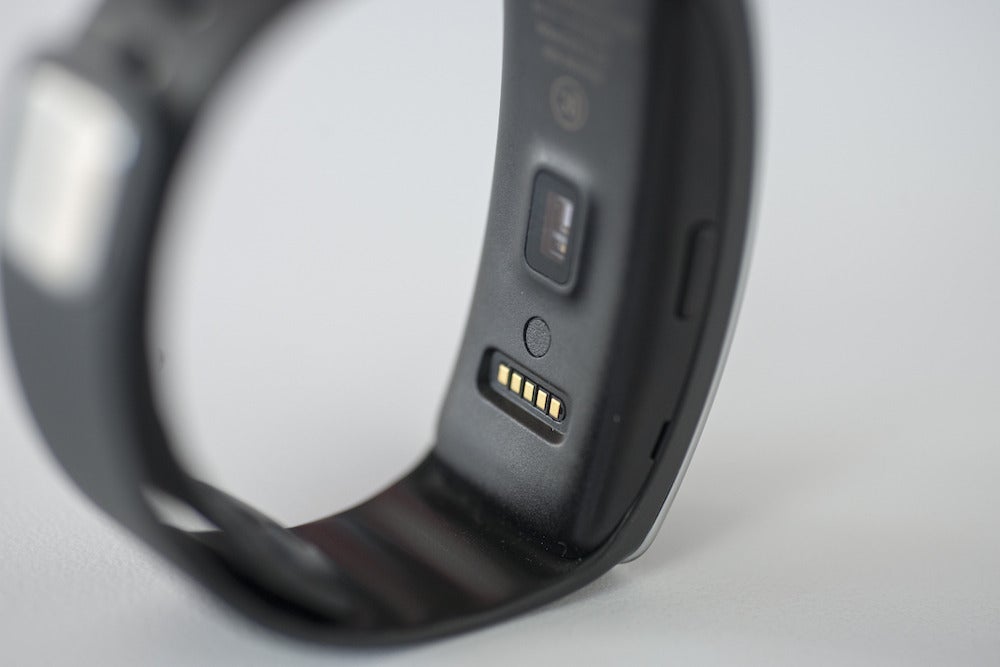
Unfortunately the Gear Fit requires a propreitary charging cradle to top off its juice.
Samsung’s Super AMOLED display technology is relatively
energy-efficient, but I still only achieved little more than a day’s
worth of use before receiving battery warning alerts at a 15 percent
charge. Somehow, Samsung claims three to four days of use between
charges. Granted, I was waking up the Gear Fit frequently during the
rigors of product testing.
But even if I experienced double the battery life of my
testing regimen, two days is still a short cycle—activity trackers from
Basis, Jawbone and Fitbit grant between five and 10 days on a single
charge. And, no, the Gear Fit can’t be charged with a simple USB
connection. It requires a proprietary cradle. And it’s not like those ever get lost.
Congratulate me for my 3-minute mile
Hey, it’s called the Gear Fit. So it should be a great
exercise tracker, right? It isn’t. Throughout three solid days of
testing, I continually logged exercise data that just plain didn’t make
sense.
The Gear Fit includes six basic fitness functions. A heart
rate monitor can log your ticker’s beats per minute, both while sitting
still and in the service of monitoring various exercise goals. A
pedometer function records how many steps you take each day. Then there
are four specific exercise modes—running, walking, cycling, hiking—that
provide coaching for those activities, and record key workout data, such
as exercise duration, distance covered, and calories burned.
To test the hiking function, I set the Gear Fit to record my trek up and down Mount Davidson,
a two-mile constitutional I take at least once a week. All the exercise
modes include a goal feature, so I set the Gear Fit to give me mad
digital props at the 30-minute mark—easily achieved for what is never
more than a 50-minute round-trip hike.
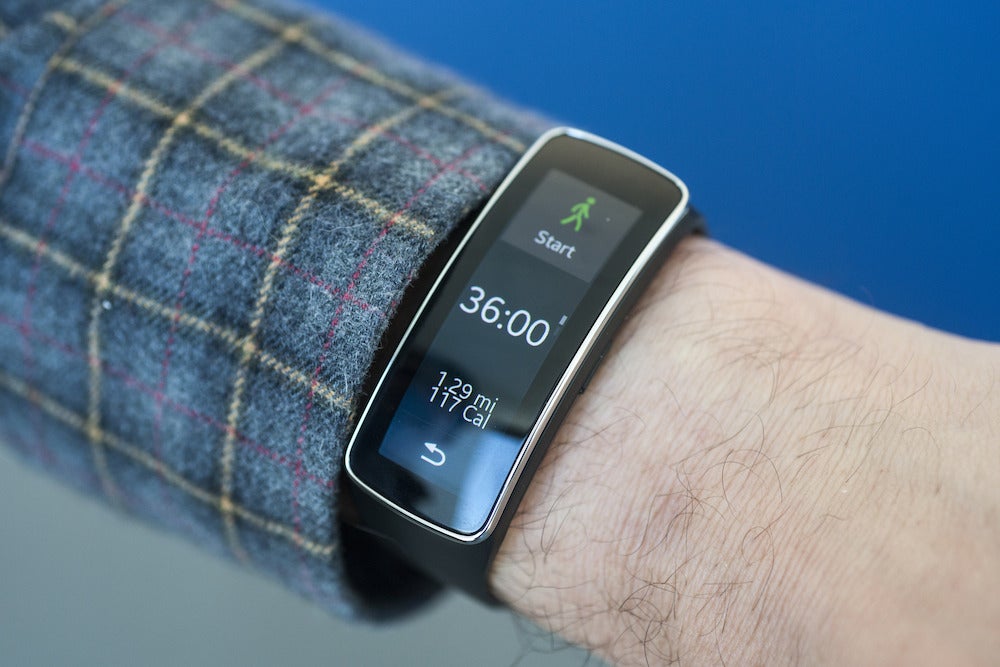
Well, as you can see from the photograph below, I must be a
really fast hiker, as I covered almost 16 miles and burned nearly 1700
calories during my 45-minute workout. Yeah, I broke a three-minute mile—while hiking. The Gear Fit also showed I hit a maximum altitude of 1115 feet, even though Mount Davidson summits at 928 feet.
Image: Jon Phillips
And here’s an example of laughably inaccurate exercise logging.
There’s no way I’m capable of a three-minute mile—let alone while
hiking.
That was the most egregious example of inaccurate data
logging, and in Samsung’s defense, the exact same hike the very next day
was recorded as 2.14 miles traveled and 212 calories burned during a
47-minute workout. But throughout my three days of testing I also
experienced inaccurate pedometer logging—and pedometer logging is table
stakes for any fit-tech wristband.
To wit: Wearing a Jawbone UP24 and Gear Fit on the very
same wrist for the exact same waking hours, I recorded the following
step counts. Thursday: 6255 for the UP24; 8494 for Gear Fit. Friday:
5835 for UP24; 7791 for Gear Fit. Saturday: 11,816 for UP24; 13,226 for
Gear Fit. It would appear the Gear Fit is a wildly generous step
counter, inflating its reports anywhere between 12 to 33 percent.
Image: Michael Homnick
Three days into using the Gear Fit, I had serious concerns about its inflated step counts.
Of course, the UP24 could be the inaccurate device in this
comparison. And it’s important to note that none of the activity tracker
manufacturers publish peer-reviewed data of their hardware accuracy.
But when I’ve tested the UP24 against a FitBit Flex and Basis B1 band,
all three devices have scored within about 200 to 300 steps of each
other on days exceeding 10,000 steps. My takeaway? The Gear Fit needs
its algorithms checked.
Unclear explanations of an opaque UI
Putting data accuracy aside, the Gear Fit’s exercise
features just aren’t very easy to use. For starters, you have to
manually engage the pedometer function each morning when you wake.
Forget to do so, and your precious footsteps will never be recorded.
Image: Michael Homnick
The S Health app looks pretty, but is confusing to navigate and doesn’t adequately explain how it merges data with the Gear Fit.
Then there’s the issue of basic feature transparency: The
Gear Fit includes a lot of specific exercise functions, but none of them
are explained very well. The interface menus on the Fit itself reveal
almost nothing about how features work or how to use them. You can learn
a bit in the Help menu of the Gear Fit Manager smartphone app, but even
this is woefully opaque. And all the functions are still
under-explained in the actual user manual.
How, precisely, was I able to burn so many calories in so little time? The S Health app never made it apparent.
For example, how exactly does the exercise coaching
function work? During a treadmill jog, coaching prompts on the Gear Fit
instructed me to “keep up this pace” one moment, and then “slow down”
just seconds later—repeatedly, ad nauseam, even though I wasn’t demonstrably changing my pace.
And during the middle of a treadmill jog, the Gear Fit
displayed “TE 2.5” when I hit a certain goal. What does this mean? If
it’s explained in either the Gear Fit Manager or user manual, I couldn’t
find a reference.
The accompanying S Health smartphone app that syncs Gear
Fit data to your handset is also opaque. It took forever for me to find
the key menu setting that tells S Health to shows Gear Fit pedometer
data rather than data collected by my Galaxy phone. Overall, S Health
has way too many features that are nested in layers of menus that are
never sufficiently explained.
Monitor your heart rate—but to what end?
Finally, the optical heart rate monitor: It’s a curious
addition, but I had trouble sussing out its usefulness, and its accuracy
is also a question mark.
Its primary application, it seems, is to measure your
resting heart rate when you’re sitting motionless. The American Heart
Association says a normal resting heart rate
is between 60 and 100 beats per minutes, and the Gear Fit usually
recorded mine between 80 and 85 bpm, which is consistent with numbers
I’ve seen from a calibrated blood pressure monitor. It’s an interesting
little feature, but I don’t see the resting heart rate function as a
killer app worthy of headlining a $200 wrist gadget.
But the heart rate monitor also keys into various active
exercise features. For example, during a monitored hike, you can watch
your heart rate data change in real-time, and at the end of your trek,
you can dig into a History menu to see your average beats per minute.
Should these numbers even be exposed? Probably not. Because they’re
likely inaccurate.
To wit: During a hike, I saw my heart rate jump from 108 to
a ridiculous 162 over the course of 15 seconds. It’s important to note
that even the Gear Fit user manual makes frequent mention of how heart
rate numbers can be inaccurate under various conditions. But here’s the
most telling advisory: “Take heart rate measurements when you are seated
and relaxed.” If this is the case, then why even allow real-time heart
rate reports during walking, running, cycling and hiking?
Image: Michael Homnick
This is the kind of inflated heart rate you get if you don’t sit still, and let the sensor do its job in peace and quiet.
Then there’s this bizarre user manual statement—the second
sentence conflicts with the first: “For a more accurate heart rate
measurement, measure your heart rate when your body is not moving. Use
the exercise feature to measure your heart rate during exercise.”
Come again? It’s weirdness like this that make me feel the Gear Fit is a better smartwatch than exercise tracker.
Simple notifications are good notifications
I’ve just spent the better part of this review beating up
on the Gear Fit for its exercise functions. But if you disentangle all
the fitness features from the wristband’s repertoire, you get a nice
smartwatch that generally works as advertised.
The Gear Fit provides notifications for phone calls, text
messages, email and other applications emanating from your Galaxy phone.
You feel a faint buzz on your wrist, and a notification pops up on the
Fit’s display. I never once experienced problems with Bluetooth pairing,
and the notifications function proved quick and reliable.
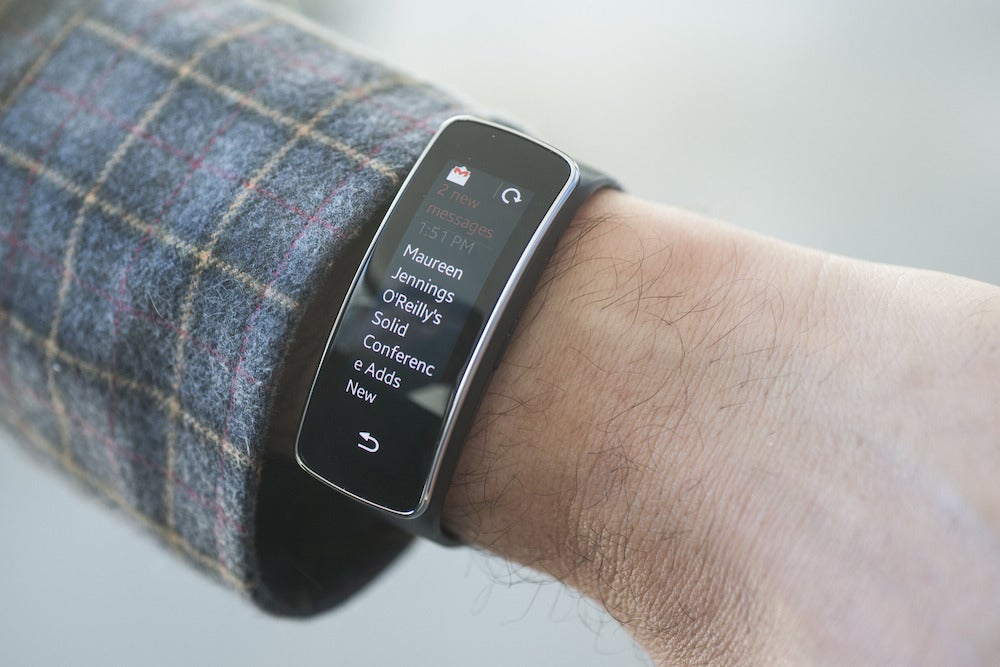
Image: Michael Homnick
Reading Gmail notifications on your wrist is damn nifty. Just make sure to set both the display and notifications toward a vertical orientation.
You can read the entire text of an email message, and reply
to texts and phone calls with simple, pre-formatted replies. (There’s
no onscreen keyboard, so these replies will have to suffice.) You can’t
fine-tune notifications to any helpful degree—like, say, defining a
white-list of contacts whose messages are allowed to break through—but
other smartwatches don’t allow granular control either. At least not
without third-party apps.
The Gear Fit also includes a Media Controller to adjust
volume and advance music tracks on your smartphone (it works great);
Stopwatch and Timer apps (yep, they work too); and a Find My Device
function to locate smartphones within Bluetooth range (check-a-rooney).
The one “extra” app that really let me down is the Sleep function.
Image: Michael Homnick
The Gear Fit’s sleep reports are barebones to the point of silliness. But these too could be improved with a firmware update.
Relative to other accelerometer-based activity trackers,
its sleep data is bare-bones to the point of absurdity. You set sleep
tracking to start before going to bed, and then hit stop when you wake.
From there, it literally reports the time between the two button pushes,
along with the percentage of that time when your body was motionless.
Other wearables delve much deeper into sleep data, and
there’s no reason the Gear Fit can’t do this too, as they’re all using
simple accelerometers for data acquisition. And, for what it’s worth,
Samsung’s “motionless” numbers did map accurately to much more granular
sleep data from my Jawbone UP24.
Let’s see a firmware upgrade come to the rescue
My main beefs with the Gear Fit all revolve around
software—and so many of these issues could be fixed with a firmware
upgrade. That’s my take, at least, because Samsung’s core sensor
hardware isn’t dramatically different from that offered by the wearables
competition.
Samsung could add much clearer Help menus to the Gear Fit
Manager, and improve feature transparency in the menus of S Health and
the wristband itself. Improved algorithms could presumably fix the data
inaccuracies I discovered in step counts and exercise tracking. Heart
rate monitoring, meanwhile, could be restricted to resting situations,
and eliminated from exercise reporting entirely.
And sleep tracking—which was added in a firmware update
just as the Gear Fit was heading for retail stores—could be expanded
with much more interesting data sets. All Samsung needs to do is better
leverage the sensor data it’s already logging.
Samsung needs to evolve its firmware as quickly as it’s already
proven it can do so. I doubt there’s any fix for the Gear Fit’s poor
battery life, but the hardware itself—and what Samsung wants to do with
it—checks off so many important boxes. Now we just need software that
works. If that day comes, I’ll happily take a second look at the Gear
Fit. There’s no reason this sparkling little wristband can’t be one of
the better wearables we’ve seen.
(READ IT CAREFULLY AND U SHOULD BE ALTLEAST 13YRS OF AGE)
If u ever wanted to earn MONEY, are atleast 13yrs of age and wanna buy legit games and other stuff u always dreamed of then make it come TRUE !!
ONE more thing before u continue,when my friend first told me about this site and showed me his gears of war-3 X-Box360 game DVD .
Which he told me of being delivered to him through this site,i was both surprised and thought of it as a silly JOKE,as some of u must be thinking now. BUT NO , When i logged on it for some days i continued but was frustrated, and asked him how to earn cash fast,He said , "NOOB !! when did i told u it was easy,i just told u it was the easiest way ever" I understood it on the spot that , patience generates numberless rewards .Then after continuing on it for one month and ordering a item with my hard earned points and money, i finally got it.
SEE THE ACTUAL POINT OF THIS SHORT PARA ON ME WAS TO TELL U THAT U CAN GET NOTHING IN JUST A FLASH OF TIME , U'LL HAVE TO DO, IF NOT MUCH THEN A LITTLE HARDWORK TO ACHIEVE SOMETHING IN UR LIFE AS WELL AS THIS SITE.
FINALLY THE DECISION IS YOURS , SO PLZ PROCEED
First read 'n' enquire about the site by clicking on it's name then simply sign up there and then(if wandered away open this blog again and click on this link) , so here u go to change ur future - CASHLE (Sign-Up using this link and get a reward of 0.50$, free head on.)
With the wholesome appeal of a fairy tale, Trine 2 is unapologetic-ally
packed with comfortable tropes. Like the first game, it stars a trio of
classic fantasy heroes: a merry knight, a sly thief, and a nervy wizard.
Their adventure bustles them through ye olde tale of rescue the
princess--via enchanted forest and murky cavern, wherein they thrash
goblins and giant spiders. But out of that conventional premise, the
game conjures a gorgeous and gratifying platform puzzler.

 Like Us


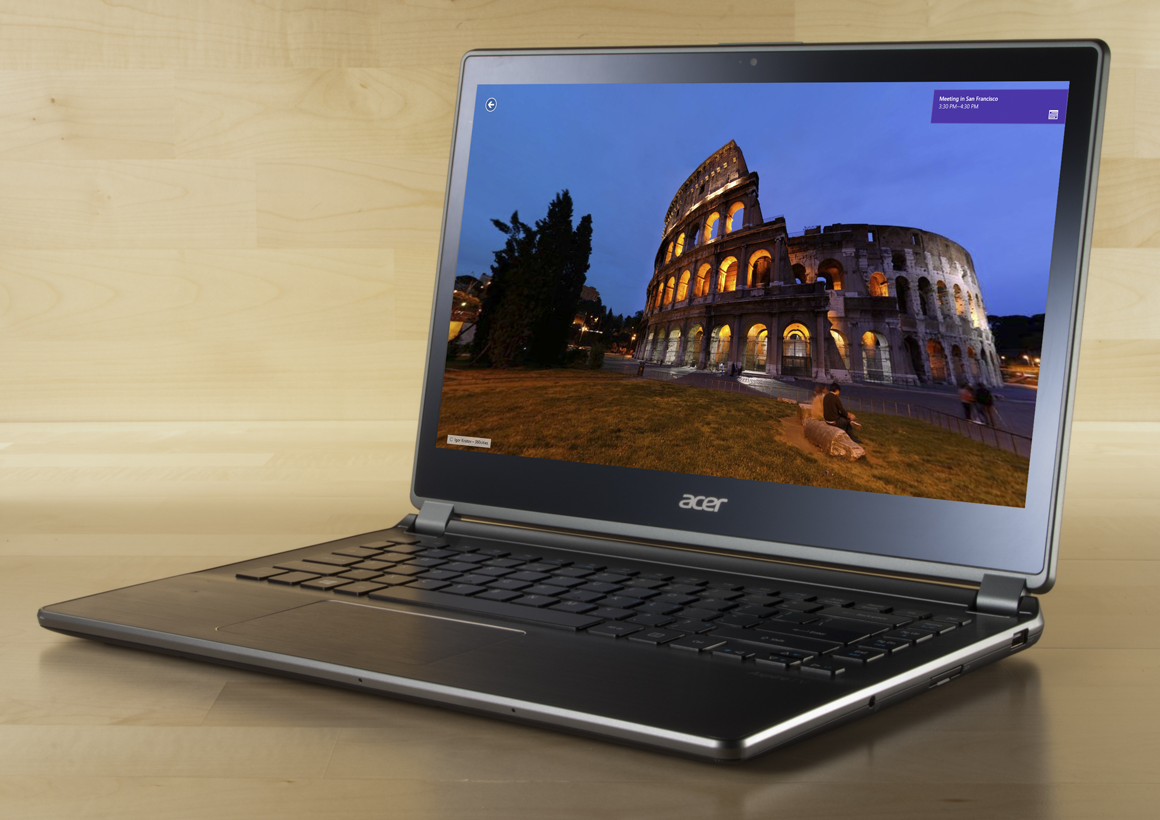
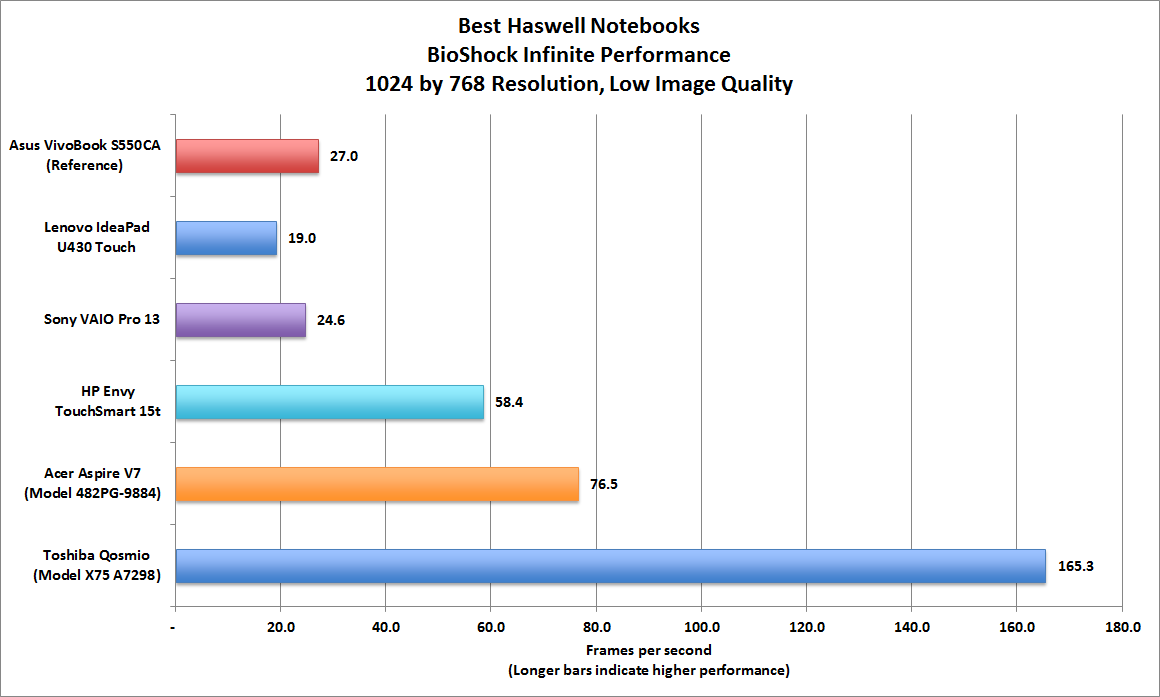
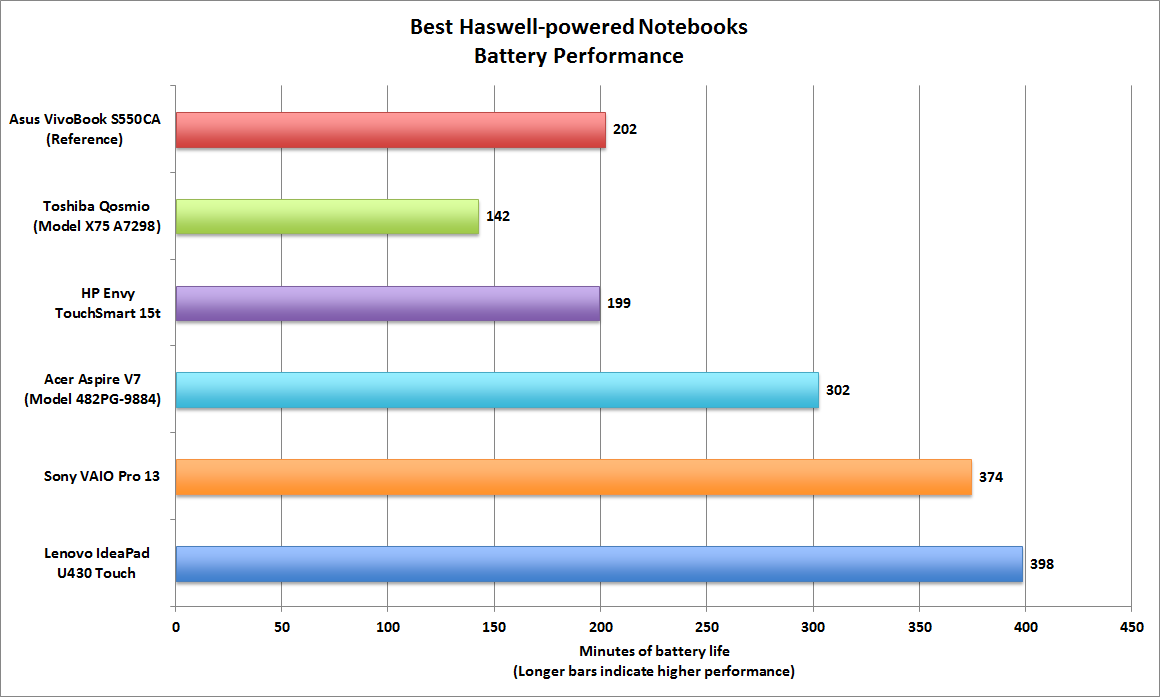


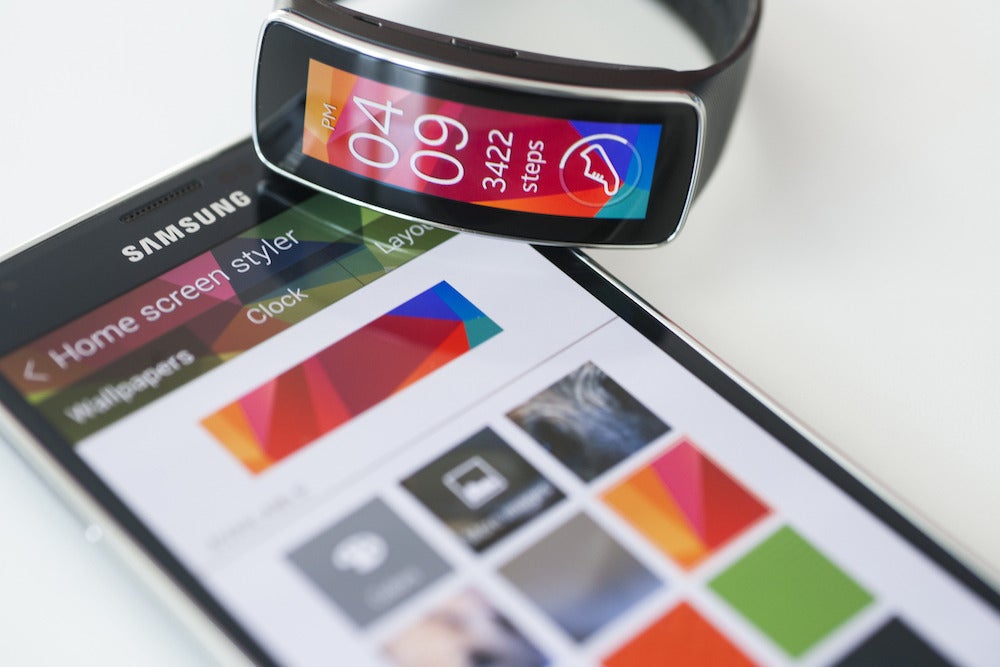

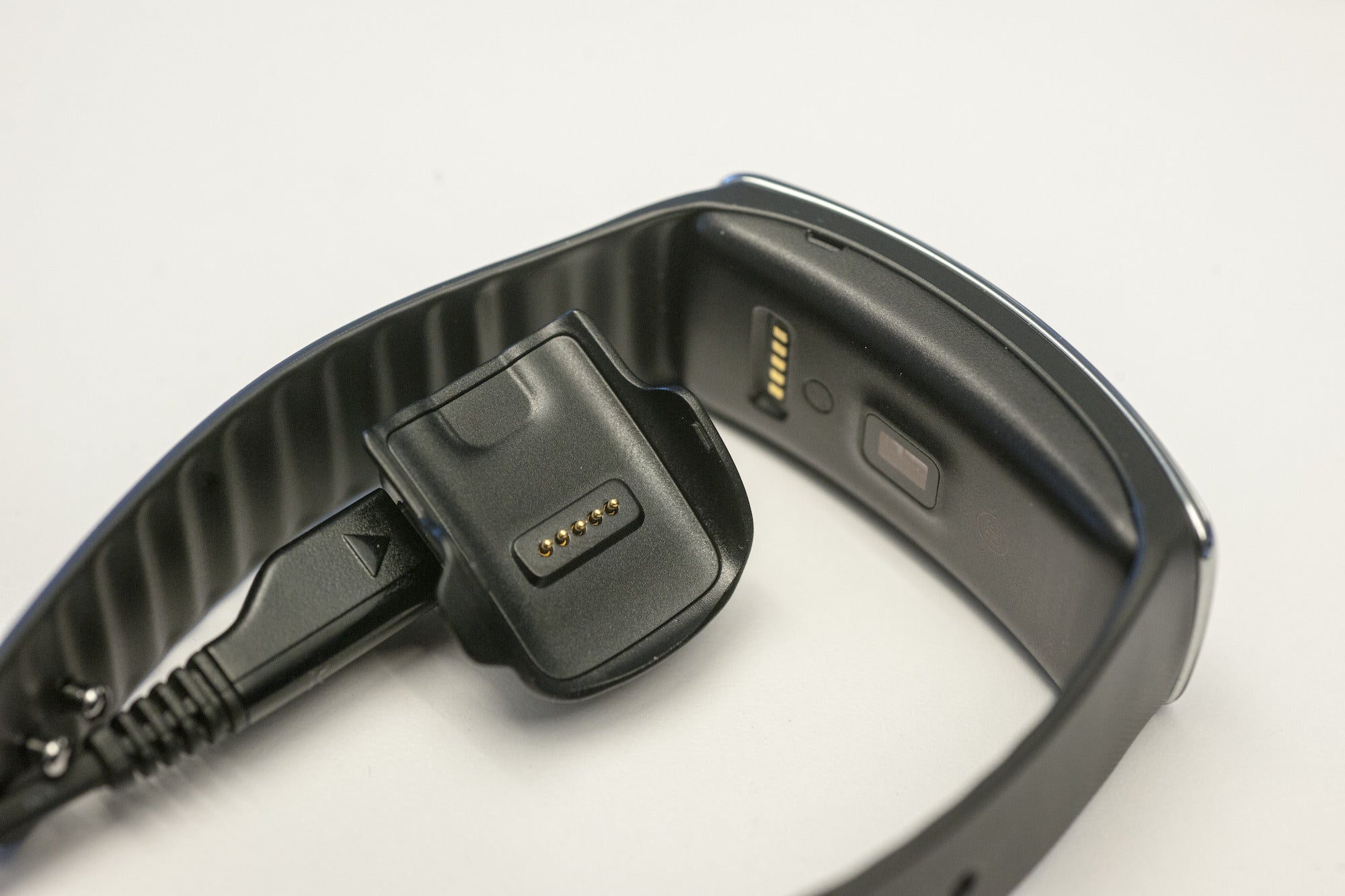
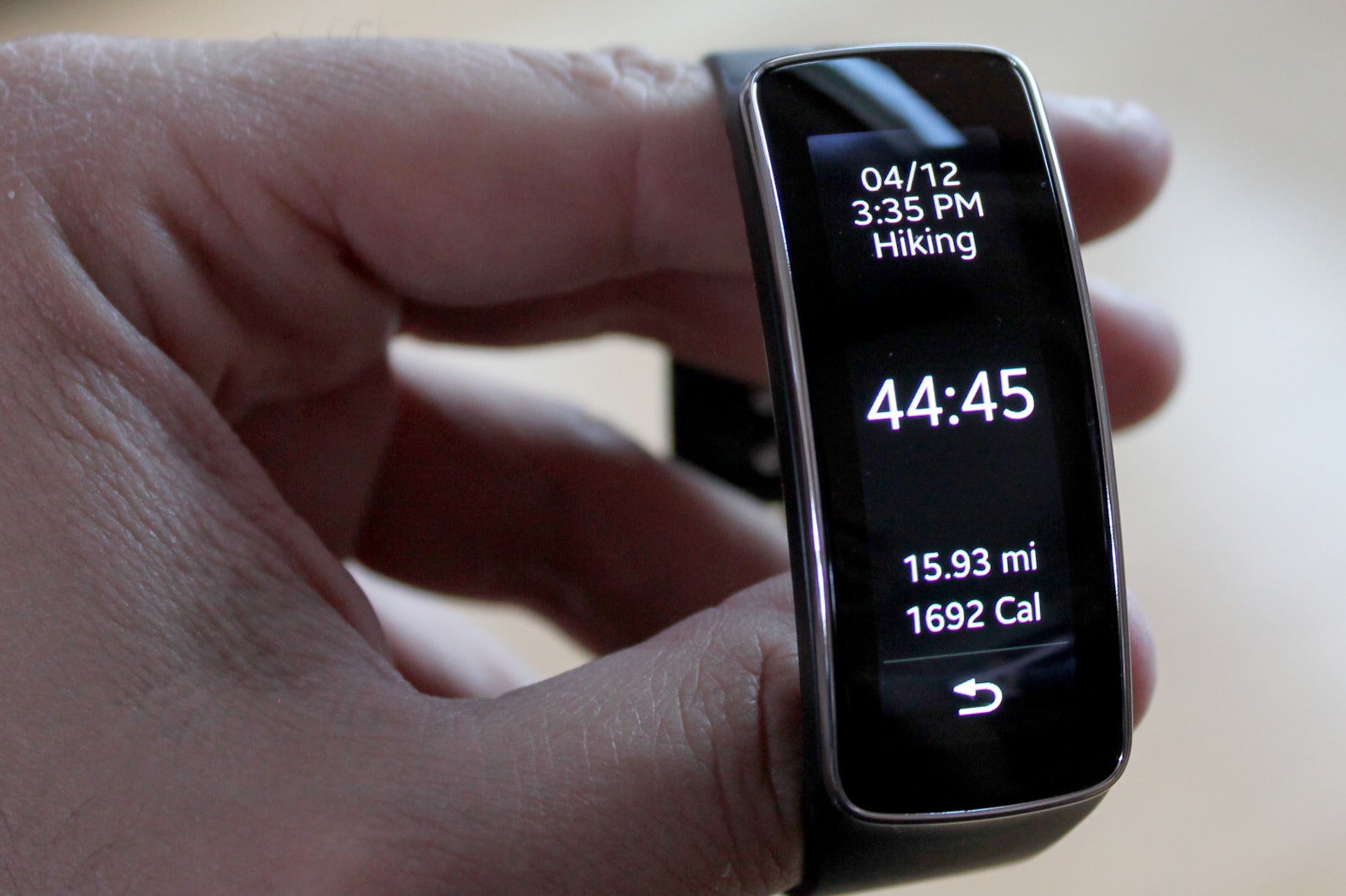
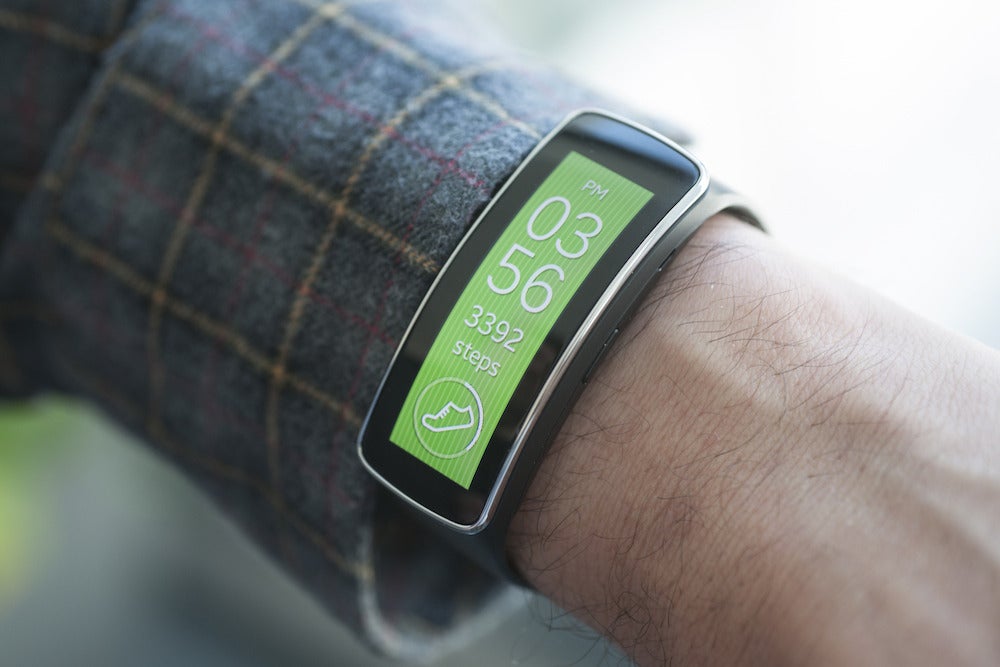
 Image: Michael Homnick